AI Meter: Track Your AI Coding Usage Without the Guesswork
A macOS menu bar app showing real-time Claude Code and Codex usage with color-coded limits and smart notifications.


TL;DR: Built a macOS menu bar app to track AI coding tool usage in real-time. Now supports both Claude Code and Codex in a unified view. Shows session and weekly limits with color indicators, sends notifications at 80% and 90%, and auto-refreshes every 2 minutes. No more guessing if you're about to hit your limit.
Why I built this
I use Claude Code daily, but I kept hitting my usage limits without warning. The CLI doesn't show usage in real-time, and checking manually is tedious. I wanted something that sits in my menu bar and tells me at a glance where I stand.
Most developers I know have the same problem: you're deep in flow, then suddenly you're rate-limited. By then it's too late to adjust your workflow.
What it does
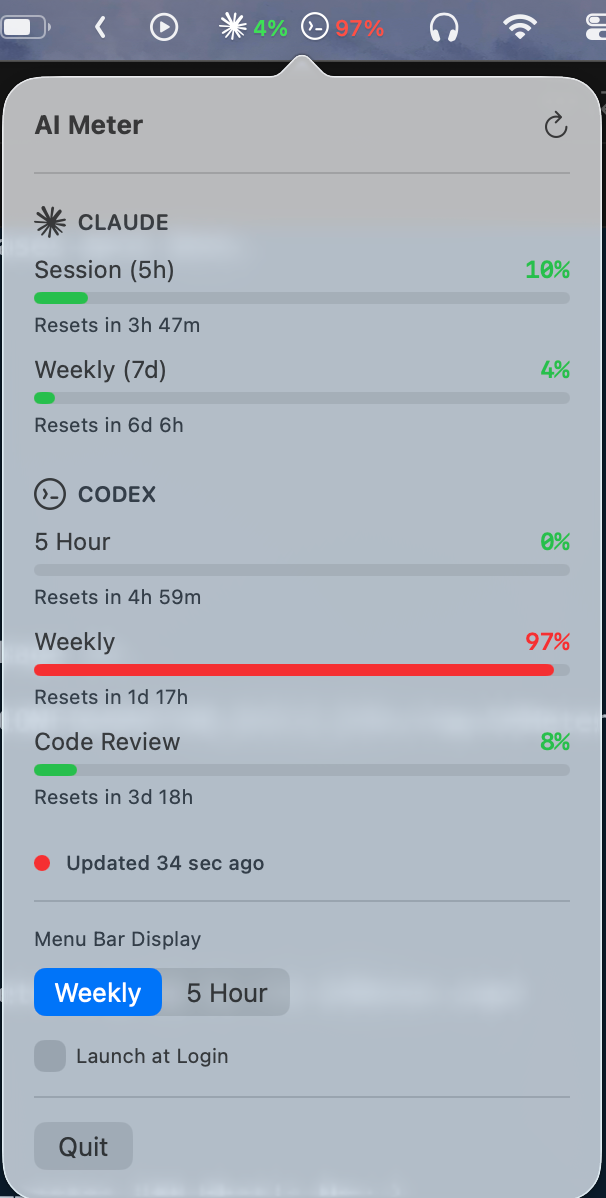
AI Meter displays your current usage percentage in the menu bar with color indicators:
- 🟢 Green: Under 70% (you're good)
- 🟡 Yellow: 70-90% (getting close)
- 🔴 Red: Over 90% (time to slow down)
It tracks both your 5-hour session limit and 7-day weekly limit. You get notifications at 80% and 90% so you can adjust before hitting the wall.
The app auto-refreshes every 2 minutes and handles wake-from-sleep gracefully with smart retry logic. You can also set it to launch at login.
v2.0 - Multi-provider support
The app was originally called ClaudeMeter and only tracked Claude Code. With v2.0, it's been renamed to AI Meter and now supports multiple providers:
AI Meter v2.0
- Claude Code and Codex tracked in a unified menu bar experience
- Provider-specific icons so you can tell at a glance which tool is close to its limit
- Switch between Weekly and 5-Hour views directly from the menu bar
- All providers fetched concurrently with retry logic
- New
UsageProviderprotocol makes it easy to add more providers in the future
The problem it solves
Without visibility into usage, you either:
- Work conservatively and underutilize your quota
- Work aggressively and get surprised by rate limits
AI Meter gives you the data to make informed decisions. You can see when you're approaching limits and adjust your workflow accordingly. And now that many of us juggle multiple AI coding tools, having them all in one place matters even more.
Try it
📥 Download AI Meter →Requires macOS 13.0+ and the Claude CLI with user:profile scope.
Installation
- Download
AIMeter.zipabove - Unzip and drag
AI Meter.appto your Applications folder - Right-click the app and select "Open" (required on first launch due to Gatekeeper)
If you previously had ClaudeMeter installed, you can delete it — AI Meter fully replaces it.
Troubleshooting
If you see "Token missing required scope," re-authenticate:
bashclaude /logout
claude
If macOS blocks the app on first launch (you double-clicked instead of right-clicking), go to System Settings → Privacy & Security, scroll down and click "Open Anyway".
It's free, open source, and runs entirely locally. No data leaves your machine. View source on GitHub.
Get more frameworks like this
Practical AI strategy for executives. No hype, just real playbooks.
SubscribeYou might also like